
Screener #
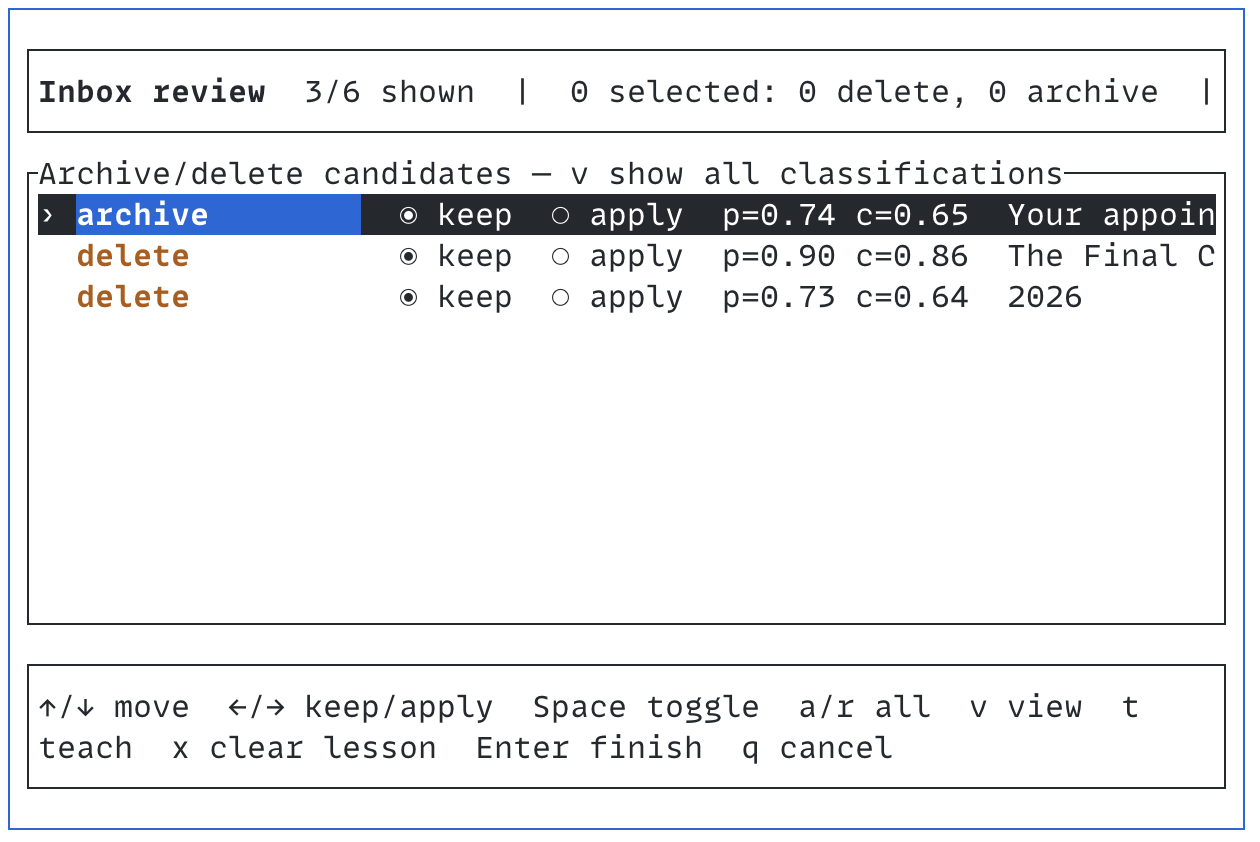
Screener classifies inbox messages with Jev through TypeSafe, presents archive and delete recommendations in a Ratatui review screen, and applies only actions the user explicitly approves. Reviewer corrections can be retained as local lessons and supplied to future classifications.
Dependencies #
- A Rust toolchain with Cargo and Rust 2024 edition support.
justinstalled and available onPATH.- The
himalayaCLI installed, onPATH, and configured with a default email account containingInboxandArchivemailboxes. - A TypeSafe API key, supplied through
TYPESAFE_API_KEYor--api-token-command. - Network access for TypeSafe API requests and the configured Himalaya backend.
Installation #
From the repository root:
just install
The install recipe runs cargo install --locked --force --path . and then writes an editable default policy to the user configuration directory. It never overwrites an existing default.json.
To install manually without just:
cargo install --locked --path .
screener --install-default-policy
When XDG_CONFIG_HOME is an absolute path, the installed policy is:
$XDG_CONFIG_HOME/screener/policies/default.json
Without XDG_CONFIG_HOME, Screener uses the platform configuration directory. Common locations are:
Linux:  ~/.config/screener/policies/default.json
macOS:  ~/Library/Application Support/screener/policies/default.json
The configured default.json takes precedence over the policy embedded in the binary. Re-running just install upgrades the binary while preserving user policy changes.
Policies #
Put named policies in the same policies directory:
$XDG_CONFIG_HOME/screener/policies/work.json
$XDG_CONFIG_HOME/screener/policies/newsletters.json
Select one by filename without the .json suffix:
screener --policy work
screener --policy newsletters
Explicit paths remain supported:
screener --policy ./policies/temporary-cleanup.json
--policy default selects the configured default.json, falling back to the embedded default when no configured file exists.
API credentials #
Set the key directly:
export TYPESAFE_API_KEY='...'
screener
Or obtain it from a password manager or another command:
screener --api-token-command 'pass show typesafe-token'
The command's trimmed standard output is used as the API key.
Selecting messages #
Screener processes the ten most recent messages by default:
screener
screener --count 100
screener --all
Use an age filter before reading bodies or classifying messages:
screener --older-than '1 week ago'
screener --count 25 --older-than '30 minutes ago'
screener --all --older-than '2 days ago'
Supported units are seconds, minutes, hours, days, and weeks. --count limits matching messages after age filtering.
Jev concurrency #
Screener reads message bodies first, then packs up to ten messages into each Jev request while keeping the serialized request under a conservative 24 KiB budget. This leaves headroom below Jev's documented context limits while preserving full message excerpts and relevant lessons whenever they fit. Results remain in inbox order regardless of completion order.
Increase or reduce the limit for the available network and TypeSafe API capacity:
screener --all --classification-concurrency 8
Accepted values are 1 through 16. Use 1 for serial classification if the API applies a strict rate limit.
If TypeSafe still reports max_tokens_exceeded, Screener transparently splits the affected batch and retries. For an oversized single-message request, it removes the least relevant historical lessons before shortening that message's submitted excerpt. A policy that cannot fit even with this reduced context fails locally with an actionable error instead of sending a known-oversized request.
TUI review #
The initial view shows archive and delete candidates. Every mailbox action defaults to keep.
| Key | Action |
|---|---|
↑ / ↓, j / k |
Move through messages |
← / h / n |
Keep the selected message |
→ / l / y |
Apply the selected archive or delete action |
Space |
Toggle keep/apply |
a |
Apply all visible actionable recommendations |
r |
Keep all visible messages |
v |
Toggle action candidates/all classifications |
t |
Teach a corrected classification |
x |
Clear the selected pending lesson |
Enter |
Finish and open final confirmation |
q / Esc |
Cancel without mailbox changes or saved lessons |
After pressing t, choose the corrected classification:
| Key | Classification |
|---|---|
1 / r |
Reply |
2 / v |
Review |
3 / a |
Archive |
4 / d |
Delete |
Enter an optional note, then press Enter to retain the lesson. A correction to reply or review forces the current message to remain in the inbox. A correction to archive or delete changes the proposed action but still defaults to keep. The final y confirmation saves lessons and applies selected mailbox actions.
Reviewer lessons #
Lessons are separate from policy files. With an absolute XDG_CONFIG_HOME, they are stored at:
$XDG_CONFIG_HOME/screener/lessons.json
Otherwise Screener uses the platform-local data directory. Override the path with:
screener --lessons-file ./private-lessons.json
Each lesson contains a compact message excerpt, the original classification, the corrected classification, an optional note, and a policy scope. Relevant lessons are included in future Jev request state; they do not modify model weights or automatically rewrite a policy.
The lesson file contains private email excerpts. Keep it local and do not publish it.
Incorporating lessons into a policy with an agent #
Periodically use a coding agent to generalize repeated lessons into durable policy rules and examples. The goal is to encode category-level boundaries without copying personal message contents or sender-specific details into the policy.
A useful request is:
Read my Screener lessons file and the configured default policy. Group repeated
classification corrections into general rules, update the policy's decision order,
action indicators, exclusions, and examples, and preserve important counterexamples.
Do not copy personal data, message IDs, addresses, or message text into the policy.
Re-scope or remove migrated lesson records only after their behavior is represented
by the policy. Validate the JSON and evaluate representative corrected cases.
Files to provide to the agent:
$XDG_CONFIG_HOME/screener/lessons.json
$XDG_CONFIG_HOME/screener/policies/default.json
Review the proposed generalizations before accepting them. A lesson may represent a one-off preference rather than a safe global rule. Keep action-required mail, direct correspondence, and durable records as explicit counterexamples when adding broad deletion preferences.
Development checks #
just check
The check recipe runs the formatting check, test suite, and Clippy with warnings denied.