

Useful for applying shaders like my EINK shader or RetroArch shaders to your monitors in macOS:
Pre-reqs #
- Apple Silicon Mac (M1+) with macOS 27 or later
Installation #
Builds from this checkout are self-contained: copy ScreenSlanger.app to your Mac and open it. The app includes its Slang compiler, libraries, and RetroArch runtime. Recipients do not need Homebrew, Xcode, or the setup script. Packaged releases are available in the Releases tab.
You can share the app alongside a standalone .slang file. If an effect uses includes, imports, textures, or a .slangp preset, share its whole shader folder so those relative paths remain intact.
Building from source #
Use Xcode 27 with its Swift 6.4 compiler and macOS 27 SDK. All targets use Swift 6 language mode, including its strict concurrency checks, and require macOS 27 or later. The setup step also requires rustup and Rust 1.93.0 to build the patched Metal runtime. Before the first build, install the pinned build dependencies:
rustup toolchain install 1.93.0 --profile minimal
./scripts/setup-dependencies.sh
This downloads Slang 2026.18 and checks its SHA-256 checksum. Slang is installed into ~/Library/Application Support/ScreenSlanger/Tools/slang/2026.18, with a current symlink that ScreenSlanger discovers automatically. The full Slang distribution is needed, including its libraries. Existing installations under ~/slang are preserved.
The script also builds librashader 0.12.0-screenslanger.3 from the checksum-verified upstream 0.12.0 source, with reviewed patches that avoid unused final-pass targets, store grayscale lookup textures more compactly, and decode and upload Metal textures one at a time. Grayscale uploads use bounded staging memory while preserving sampled values, and color and 16-bit images retain their original conversion behavior. A bundled librashader-compiler helper compiles GLSL in a separate, short-lived process so its compiler state is released after loading. Setup uses Rust 1.93.0, pinned Cargo dependencies, and optimized builds. It downloads Cargo dependencies and builds the Metal runtime and helper once, installing both into ~/Library/Application Support/ScreenSlanger/Tools/librashader/0.12.0-screenslanger.3 without replacing existing official or previous local runtime installations.
This runtime handles RetroArch presets, including multiple passes, custom vertex stages, reflected uniforms, textures, and filtering. The app includes the runtime and compiler helper, so Homebrew, glslang, and spirv-cross are not required. It also includes the MPL-2.0 license, original source archive, exact patches, checksums, and rebuild instructions. The vendored C header's origin and the runtime's build and update procedures are documented in CONTRIBUTING.md.
Open ScreenSlanger.xcodeproj, select the ScreenSlanger scheme and My Mac destination, then build and run. The Bundle Shader Runtimes build phase verifies the installed runtime, copies the pinned tools, licenses, and corresponding source into the app, and signs the nested executables and libraries before Xcode signs the app. Xcode builds never download tools or compile Rust. There are no Swift packages to resolve.
Run the setup script again after pulling project updates. The Slang and librashader versions and checksums are pinned in the script so updates can be reviewed and tested together with the app. The macOS 27 dependency baseline is:
| Dependency | Version | Purpose |
|---|---|---|
| Slang | 2026.18 | Native Slang effects |
| librashader | 0.12.0-screenslanger.3 | RetroArch Metal runtime and compiler helper |
| Rust | 1.93.0 | Build-time compiler for librashader; not required to run the app |
To inspect installed versions:
"$HOME/Library/Application Support/ScreenSlanger/Tools/slang/current/bin/slangc" -version
Unhosted tests and development probes can override their tools with SLANG_PATH, LIBRASHADER_PATH, and LIBRASHADER_COMPILER_PATH. Without a compiler override, they look for librashader-compiler beside the selected librashader runtime. The application always uses its bundled runtime and helper, ignoring those environment overrides. An incomplete app reports an error instead of depending on the recipient's development environment or retaining an in-process GLSL compiler.
Run the native Swift Testing suite after updating the compilers. In Xcode, use Product → Test (⌘U), or run:
xcodebuild test -project ScreenSlanger.xcodeproj -scheme ScreenSlanger -destination 'platform=macOS'
The tests require a Mac with access to its Metal GPU and the dependencies installed above. They exercise the app's production rendering core, including native Slang and RetroArch pixels, multiple passes, includes, reflected uniforms, texture loading, and reloads. They also check compiler cancellation and deadlines, frame scheduling, metrics, and saved settings. The test bundle runs without launching the app or reading or changing your saved settings. Xcode builds a test-only Swift executable, ShaderCompilerProbe, to verify large compiler output, cancellation, and timeouts. Fixtures are bundled, and generated files use temporary directories.
Usage #
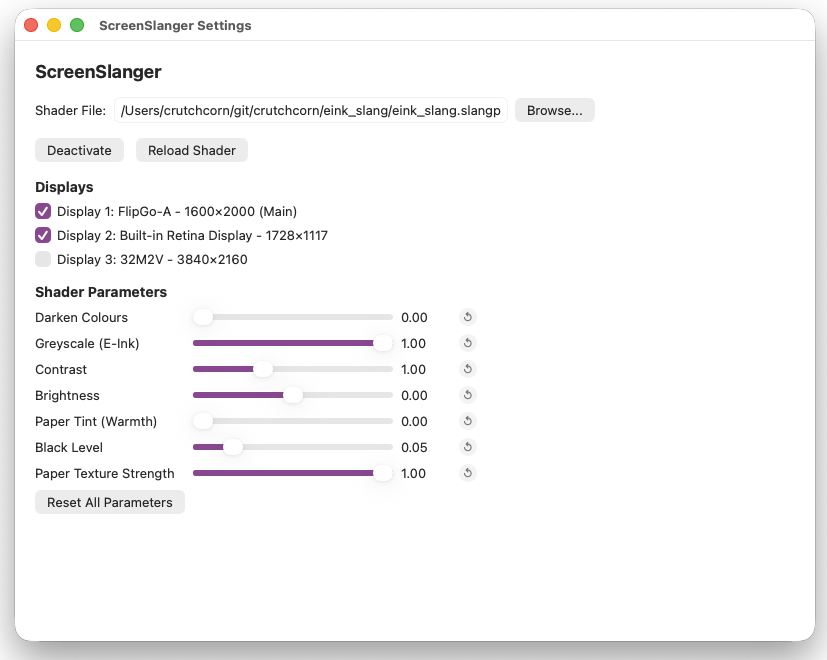
Open the app's settings and browse to a .slang shader or .slangp preset.
To test ScreenSlanger, you can use the waves shader example in our project.
Select a shader and at least one display, then click Activate. macOS asks for screen-recording access when capture first starts; if needed, enable ScreenSlanger in System Settings → Privacy & Security → Screen & System Audio Recording and try again. Settings remain available if capture fails. Deactivate stops capture, and Reload Shader recompiles the selected shader, including files referenced by a preset.
The FPS setting caps both capture and drawing. Enable animation on an unchanged desktop for time-dependent effects; static filters can draw only when the captured image changes. Shader compilation runs in the background, so controls stay responsive while an effect loads.