# git-pad
A **lightweight** **git-native** _issue tracking tool_
that uses custom refs(`refs/issues/latest`, `refs/remote/$REMOTE/issues/latest`) and an orphaned-working tree.
- Personal motivation:
> I wanted issue tracking to be fully integrated into a Git repository while remaining lightweight and flexible. Most Git-native issue management tools require additional installation or embed issues into commits or Git notes, which makes searching and modifying them cumbersome. Instead, I wanted issues to exist as simple files so they could be searched, edited, and managed freely.
## Table of Contents
* Philosophy
* Design
* Install
* Usage
* Implementation Detail
* Related Projects
* Discussion
* To-Dos
* Contributions
## Philosophy [▲](#table-of-contents)
* run `git pad $COMMAND`
* most commands are just like git commands
* `init`, `clone`, `log`, `status`, `commit`, `push`, `fetch`, `merge`, `pull`, `remote`
* some are for issue managing
* `new`, `list`, `show`, `comment`, `edit`, `search`, `remove`
* No staginag area
* `commit` = `add` + `commit` (in git)
## Design [▲](#table-of-contents)
* Distributed
* No 3rd-party service needed -> No vendor lock-in
* To avoid conflicts between locally generated issue files, we used random filename base on local repository(Compared to using UUID, ULID, easy to remember).
* Issues are stored in the same repository
* No another independent repository(main point of git-native issue tracking tool)
* Issues reside in a seperate folder and have different isolated history
* Using custom ref, issue-ref would not be shown in `git branch`
* Using worktree, you can do whatever git commands in the linked worktree(eg. .git-pad/)
* Issues isolated from codes
* Issue file names are simple and readable
* Most hash or ULID, UUID are long and hard to read
* Intentionally choose to use sequence with repo ID(which is random 6 alphabets) (eg. `ABCDEF-000001`)
* Issues, comments are markdown files
* Easy to create, modify
* You can add custom fields in addition to `title:`, `status:`, etc.
* Easy to search and custom advanced search is possible(using other tools of your choice)
* issues are just markdown files so you can go into the folder and use `grep`, `ag`, `rg`, etc. if you need.
* Do issues need to be stored as git commits or notes, like git-bug, git-native-issue, or git-appraisal? I could not find any reason to support it.
* check the related discussion at [HackersNews](https://news.ycombinator.com/item?id=47135581)
* Commands are just like git
* most commands work like git(status/commit/push/fetch/merge) except for
* no staging area, so no add
* no push --force, push --force-with-lease
* intentionally no re-writing history
* Minimal dependency
* in bash scripts
* No server-side setup required
* lightweight
* Freedom to customize
* You can use pre-commit, post-commit hooks.
* eg. Use AI API to polish issues
## Install [▲](#table-of-contents)
* run the following in bash(or zsh)
```
git clone https://github.com/kwhkim/git-pad.git
cd git-pad
bash install.sh
```
Script above will add the line similar to the following to ~/.bashrc or ~/.zschrc depending on OS
```
## git-pad
PATH=$PATH:/home/user/git/git-pad;
export PATH;
source /home/user/git/git-pad/autocompletion.sh;
```
Delete them to uninstall.
Or you can use `git-pad` with doing the following,
```bash
git clone https://github.com/kwhkim/git-pad.git
cd git-pad
PATH=$PATH:$PWD
```
⚠️ If you already have linked worktree and set `extensions.worktreeConfig` as false, there is some risk of trouble. So you'd better copy the original repository before trying this. I'd advise you to run `migrate_worktree_config.sh` first to set `extensions.worktreeConfig` as true and do some setting. This will be incorporated into `git pad init` in a later version
## Usage [▲](#table-of-contents)
```{bash}
# Quick-setup or run install.sh above
git clone https://github.com/kwhkim/git-pad.git
cd git-pad
PATH=$PATH:$PWD # replace $PWD with the directory name where git-pad, git-pad-utils live
# Current issues with project git-pad
git pad clone
git pad list
git pad show ECBFEC-0004
git pad show ECBFEC4
git pad show E # if auto-completion is possible
# get to the project directory and test git-pad
cd $GIT_PROJECT_PATH
git pad init # or git pad clone if there is already remote
git pad list
git pad --open --sort-pri # open issues only, sorted by priority
# A
git pad show $ISSUE_ID
git pad comment $ISSUE_ID
git pad new # or git pad edit $ISSUE_ID
git pad edit $ISSUE_ID
git pad comment $ISSUE_ID
git pad status
git pad commit
git pad fetch
git pad merge
# When conflicts, git pad edit $ISSUE_ID
git pad push
git pad list
# goes to A
```
## Implementation detail [▲](#table-of-contents)
* Git-Embedded Distributed Issues Management System
* `git-pad` : dispatcher for commands like `git pad init`, `git pad new`, etc.
* `git-pad-utils` : functions like `git_pad_init`
* `new_filename.sh`
* `gen_repo_id` : random 6 alphabets
* `repo_id_in_use $1` : check if `$1` is used in any issue file
* `next_seq KSTEDF .md` : `KSTEDF-nnnn.md`라는 파일 형식에서 가장 마지막 `nnnn` 다음
* `new_filename .md` : `.md` 파일에서 새로운 파일 이름
* GitHub-Issues
* `gh_list_download.sh` : download github issue list
* Forward time slice scan first, then Backward time slice scan.
* `gh_list_state.json`
* Stores the coverage of github issues updates
* History
* Originally named `git-issue`. But there is already another project named `git-issue`(see Related Projects), so it was renamed to **git-pad**. So the filename and functions are all renamed to **pad**(commit `...`).
## Related Projects(as-of 2026.02.04) [▲](#table-of-contents)
| | Storage |
| --------- | ---------------------- |
| `git-native-issue` | git commits(empty) |
| `git-appraise` | git notes |
| `git-issue` | repo |
| `git-dit` | git commits(empty) |
| `git-bug` | custom ref |
| `BE` | file |
* [git-native-issue](https://github.com/remenoscodes/git-native-issue)
* seems being actively developed and tested
* Using timestamp to resolve conflicts and store issues in empty commits.
* Implemented in bash
* latest release(v1.3.3) : 2026.2.16
* [Yona: Project Hosting SW](https://github.com/yona-projects/yona)
* Git/SVN + MariaDB
* latest release(1.16.0) : 2023.01.09
* [git-appraise](https://github.com/google/git-appraise)
* uses Git Notes, a built-in Git feature for attaching metadata to commits without modifying the commits themselves.
* Not easy to modify, search(use `git grep`)
* Implemented in Go, requires Go tools installed.
* latest release : 2021.04.23
* [BE(Bugs-Everywhere)](https://github.com/aaiyer/bugseverywhere)
* issues dependent on a branch
* implemented in python
* latest release(1.1.1) : 2012.11.17
* [git-issue](https://github.com/dspinellis/git-issue)
* independent repository
* implemented in bash
* latest commit : 4 months ago
* [git-bug](https://github.com/git-bug/git-bug)
* custom reference
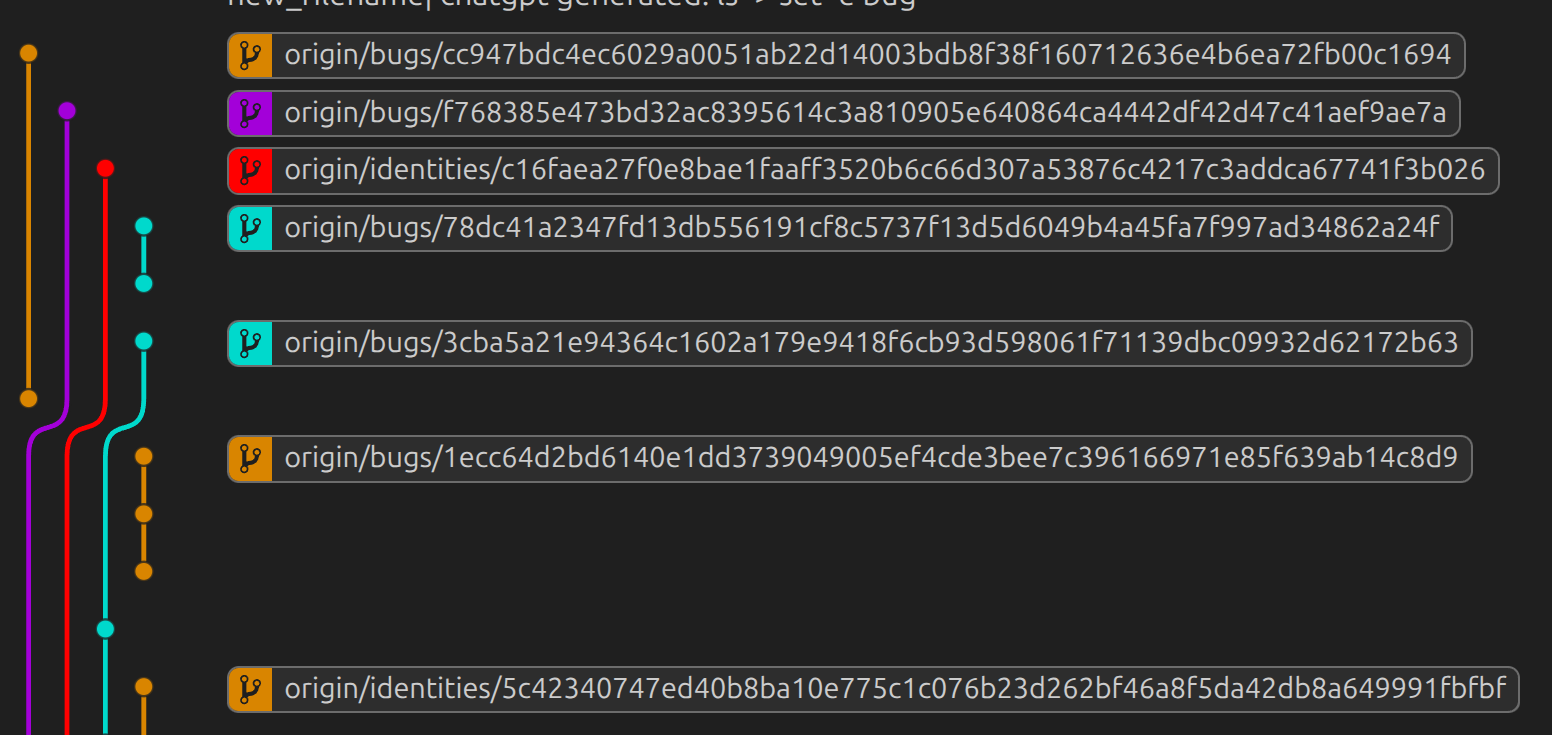
* In VScode git-graph with remote branches on, the graph gets messy as the number of bugs increases(See the figure 1 below)
* `git gc` or `git fsck` gets slower
* latest release : 2025.05.19
* [git-dit](https://github.com/git-dit/git-dit)
* issues are represented by empty commits(No file changes)
* issue-commits using git's ref(`refs/dit`)
* latest release(0.4.0) : 2017.09.15
* [git-track](https://github.com/dhesse/Git-Track)
* no git-native, local(cannot be shared using git)
* latest commit : 15 years ago
Figure 1: VScode git-graph gets messy
## Discussion about git-native issue tracking tools [▲](#table-of-contents)
* [reddit/git](https://www.reddit.com/r/git/)
* [reddit: Decentralized Issue Tracking](https://www.reddit.com/r/programming/comments/4od2ni/decentralized_issue_tracking/)
* [reddit: What is your simple issue tracking system](https://www.reddit.com/r/git/comments/wg6mk6/what_is_your_simple_issue_tracking_system/)
* [HackersNews: Show HN: Git-native-issue - issues stored as commits in refs/issues/](https://news.ycombinator.com/item?id=47135581)
* [StackOverflow: Is possible to store repository issues in the git repository?](https://stackoverflow.com/questions/19938579/is-possible-to-store-repository-issues-in-the-git-repository)
* [StackOverflow: Keeping track of To-Do and issues in Git](https://stackoverflow.com/questions/7060973/keeping-track-of-to-do-and-issues-in-git)
## To-Dos [▲](#table-of-contents)
* ~~auto-completion~~ : enable `` after `git pad` or `git pad edit`
* MacOS's zsh is yet to be supported
* Different Template for Issue types
* Current, only one `TEMPLATE.md` for all issues
* possibly, `git pad new --type=bug` to specify the type and the template.
* github bridge
* Download github issue list from `$REPO_KEY`(in `gh_list_vars.sh`)
* `gh_list_vars.sh`
* `gh_list_init.sh`
* `gh_list_download.sh`, `gh_list_download_stopped.sh`
* `gh_list_export.sh`
* gitlab bridge
* gitbucket bridge
* add LICENSE
*
You can see the list of issues, todos in the git-embedded issues using `git-pad`.
## Contributions [▲](#table-of-contents)
Contributions are welcome. Fork the repo and send a PR.