---
title: Reporters | Guide
outline: deep
---
# Reporters
Vitest provides several built-in reporters to display test output in different formats, as well as the ability to use custom reporters. You can select different reporters either by using the `--reporter` command line option, or by including a `reporters` property in your [configuration file](/config/#reporters). If no reporter is specified, Vitest will use the `default` reporter as described below.
Using reporters via command line:
```bash
npx vitest --reporter=verbose
```
Using reporters via [`vitest.config.ts`](/config/):
```ts
import { defineConfig } from 'vitest/config'
export default defineConfig({
test: {
reporters: ['verbose']
},
})
```
Some reporters can be customized by passing additional options to them. Reporter specific options are described in sections below.
```ts
export default defineConfig({
test: {
reporters: [
'default',
['junit', { suiteName: 'UI tests' }]
],
},
})
```
## Reporter Output
By default, Vitest's reporters will print their output to the terminal. When using the `json`, `html` or `junit` reporters, you can instead write your tests' output to a file by including an `outputFile` [configuration option](/config/#outputfile) either in your Vite configuration file or via CLI.
:::code-group
```bash [CLI]
npx vitest --reporter=json --outputFile=./test-output.json
```
```ts [vitest.config.ts]
export default defineConfig({
test: {
reporters: ['json'],
outputFile: './test-output.json'
},
})
```
:::
## Combining Reporters
You can use multiple reporters simultaneously to print your test results in different formats. For example:
```bash
npx vitest --reporter=json --reporter=default
```
```ts
export default defineConfig({
test: {
reporters: ['json', 'default'],
outputFile: './test-output.json'
},
})
```
The above example will both print the test results to the terminal in the default style and write them as JSON to the designated output file.
When using multiple reporters, it's also possible to designate multiple output files, as follows:
```ts
export default defineConfig({
test: {
reporters: ['junit', 'json', 'verbose'],
outputFile: {
junit: './junit-report.xml',
json: './json-report.json',
},
},
})
```
This example will write separate JSON and XML reports as well as printing a verbose report to the terminal.
## Built-in Reporters
### Default Reporter
By default (i.e. if no reporter is specified), Vitest will display results for each test suite hierarchically as they run, and then collapse after a suite passes. When all tests have finished running, the final terminal output will display a summary of results and details of any failed tests.
Example output for tests in progress:
```bash
✓ __tests__/file1.test.ts (2) 725ms
✓ __tests__/file2.test.ts (5) 746ms
✓ second test file (2) 746ms
✓ 1 + 1 should equal 2
✓ 2 - 1 should equal 1
```
Final output after tests have finished:
```bash
✓ __tests__/file1.test.ts (2) 725ms
✓ __tests__/file2.test.ts (2) 746ms
Test Files 2 passed (2)
Tests 4 passed (4)
Start at 12:34:32
Duration 1.26s (transform 35ms, setup 1ms, collect 90ms, tests 1.47s, environment 0ms, prepare 267ms)
```
### Basic Reporter
The `basic` reporter displays the test files that have run and a summary of results after the entire suite has finished running. Individual tests are not included in the report unless they fail.
:::code-group
```bash [CLI]
npx vitest --reporter=basic
```
```ts [vitest.config.ts]
export default defineConfig({
test: {
reporters: ['basic']
},
})
```
:::
Example output using basic reporter:
```bash
✓ __tests__/file1.test.ts (2) 725ms
✓ __tests__/file2.test.ts (2) 746ms
Test Files 2 passed (2)
Tests 4 passed (4)
Start at 12:34:32
Duration 1.26s (transform 35ms, setup 1ms, collect 90ms, tests 1.47s, environment 0ms, prepare 267ms)
```
### Verbose Reporter
Follows the same hierarchical structure as the `default` reporter, but does not collapse sub-trees for passed test suites. The final terminal output displays all tests that have run, including those that have passed.
:::code-group
```bash [CLI]
npx vitest --reporter=verbose
```
```ts [vitest.config.ts]
export default defineConfig({
test: {
reporters: ['verbose']
},
})
```
:::
Example of final terminal output for a passing test suite:
```bash
✓ __tests__/file1.test.ts (2) 725ms
✓ first test file (2) 725ms
✓ 2 + 2 should equal 4
✓ 4 - 2 should equal 2
✓ __tests__/file2.test.ts (2) 746ms
✓ second test file (2) 746ms
✓ 1 + 1 should equal 2
✓ 2 - 1 should equal 1
Test Files 2 passed (2)
Tests 4 passed (4)
Start at 12:34:32
Duration 1.26s (transform 35ms, setup 1ms, collect 90ms, tests 1.47s, environment 0ms, prepare 267ms)
```
### Dot Reporter
Prints a single dot for each completed test to provide minimal output while still showing all tests that have run. Details are only provided for failed tests, along with the `basic` reporter summary for the suite.
:::code-group
```bash [CLI]
npx vitest --reporter=dot
```
```ts [vitest.config.ts]
export default defineConfig({
test: {
reporters: ['dot']
},
})
```
:::
Example terminal output for a passing test suite:
```bash
....
Test Files 2 passed (2)
Tests 4 passed (4)
Start at 12:34:32
Duration 1.26s (transform 35ms, setup 1ms, collect 90ms, tests 1.47s, environment 0ms, prepare 267ms)
```
### JUnit Reporter
Outputs a report of the test results in JUnit XML format. Can either be printed to the terminal or written to an XML file using the [`outputFile`](/config/#outputfile) configuration option.
:::code-group
```bash [CLI]
npx vitest --reporter=junit
```
```ts [vitest.config.ts]
export default defineConfig({
test: {
reporters: ['junit']
},
})
```
:::
Example of a JUnit XML report:
```xml
AssertionError: expected 5 to be 4 // Object.is equality
❯ __tests__/test-file-1.test.ts:20:28
```
The outputted XML contains nested `testsuites` and `testcase` tags. You can use the reporter options to configure these attributes:
```ts
export default defineConfig({
test: {
reporters: [
['junit', { suiteName: 'custom suite name', classname: 'custom-classname' }]
]
},
})
```
### JSON Reporter
Outputs a report of the test results in JSON format. Can either be printed to the terminal or written to a file using the [`outputFile`](/config/#outputfile) configuration option.
:::code-group
```bash [CLI]
npx vitest --reporter=json
```
```ts [vitest.config.ts]
export default defineConfig({
test: {
reporters: ['json']
},
})
```
:::
Example of a JSON report:
```json
{
"numTotalTestSuites": 4,
"numPassedTestSuites": 2,
"numFailedTestSuites": 1,
"numPendingTestSuites": 1,
"numTotalTests": 4,
"numPassedTests": 1,
"numFailedTests": 1,
"numPendingTests": 1,
"numTodoTests": 1,
"startTime": 1697737019307,
"success": false,
"testResults": [
{
"assertionResults": [
{
"ancestorTitles": [
"",
"first test file"
],
"fullName": " first test file 2 + 2 should equal 4",
"status": "failed",
"title": "2 + 2 should equal 4",
"duration": 9,
"failureMessages": [
"expected 5 to be 4 // Object.is equality"
],
"location": {
"line": 20,
"column": 28
},
"meta": {}
}
],
"startTime": 1697737019787,
"endTime": 1697737019797,
"status": "failed",
"message": "",
"name": "/root-directory/__tests__/test-file-1.test.ts"
}
]
}
```
### HTML Reporter
Generates an HTML file to view test results through an interactive [GUI](/guide/ui). After the file has been generated, Vitest will keep a local development server running and provide a link to view the report in a browser.
Output file can be specified using the [`outputFile`](/config/#outputfile) configuration option. If no `outputFile` option is provided, a new HTML file will be created.
:::code-group
```bash [CLI]
npx vitest --reporter=html
```
```ts [vitest.config.ts]
export default defineConfig({
test: {
reporters: ['html']
},
})
```
:::
::: tip
This reporter requires installed [`@vitest/ui`](/guide/ui) package.
:::
### TAP Reporter
Outputs a report following [Test Anything Protocol](https://testanything.org/) (TAP).
:::code-group
```bash [CLI]
npx vitest --reporter=tap
```
```ts [vitest.config.ts]
export default defineConfig({
test: {
reporters: ['tap']
},
})
```
:::
Example of a TAP report:
```bash
TAP version 13
1..1
not ok 1 - __tests__/test-file-1.test.ts # time=14.00ms {
1..1
not ok 1 - first test file # time=13.00ms {
1..2
not ok 1 - 2 + 2 should equal 4 # time=11.00ms
---
error:
name: "AssertionError"
message: "expected 5 to be 4 // Object.is equality"
at: "/root-directory/__tests__/test-file-1.test.ts:20:28"
actual: "5"
expected: "4"
...
ok 2 - 4 - 2 should equal 2 # time=1.00ms
}
}
```
### TAP Flat Reporter
Outputs a TAP flat report. Like the `tap` reporter, test results are formatted to follow TAP standards, but test suites are formatted as a flat list rather than a nested hierarchy.
:::code-group
```bash [CLI]
npx vitest --reporter=tap-flat
```
```ts [vitest.config.ts]
export default defineConfig({
test: {
reporters: ['tap-flat']
},
})
```
:::
Example of a TAP flat report:
```bash
TAP version 13
1..2
not ok 1 - __tests__/test-file-1.test.ts > first test file > 2 + 2 should equal 4 # time=11.00ms
---
error:
name: "AssertionError"
message: "expected 5 to be 4 // Object.is equality"
at: "/root-directory/__tests__/test-file-1.test.ts:20:28"
actual: "5"
expected: "4"
...
ok 2 - __tests__/test-file-1.test.ts > first test file > 4 - 2 should equal 2 # time=0.00ms
```
### Hanging Process Reporter
Displays a list of hanging processes, if any are preventing Vitest from exiting safely. The `hanging-process` reporter does not itself display test results, but can be used in conjunction with another reporter to monitor processes while tests run. Using this reporter can be resource-intensive, so should generally be reserved for debugging purposes in situations where Vitest consistently cannot exit the process.
:::code-group
```bash [CLI]
npx vitest --reporter=hanging-process
```
```ts [vitest.config.ts]
export default defineConfig({
test: {
reporters: ['hanging-process']
},
})
```
:::
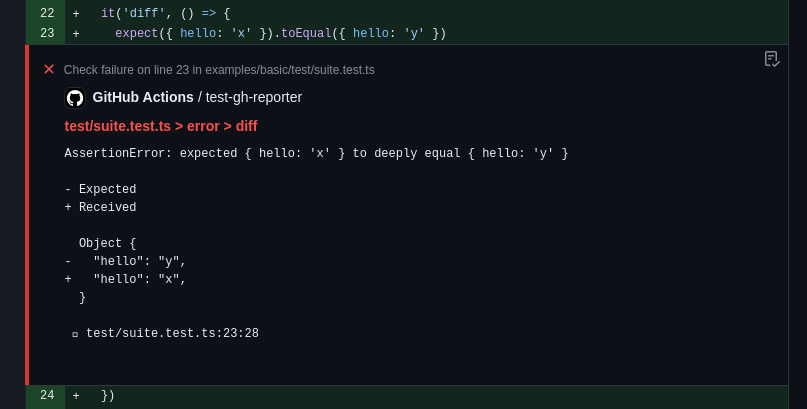
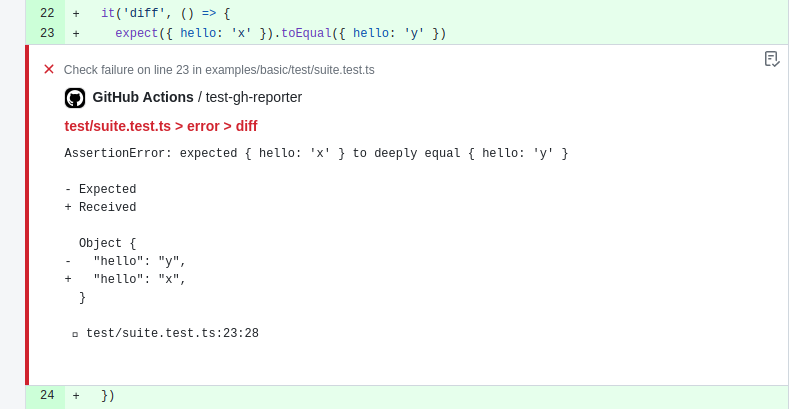
### Github Actions Reporter {#github-actions-reporter}
Output [workflow commands](https://docs.github.com/en/actions/using-workflows/workflow-commands-for-github-actions#setting-an-error-message)
to provide annotations for test failures. This reporter is automatically enabled with a [`default`](#default-reporter) reporter when `process.env.GITHUB_ACTIONS === 'true'`.
If you configure non-default reporters, you need to explicitly add `github-actions`.
```ts
export default defineConfig({
test: {
reporters: process.env.GITHUB_ACTIONS ? ['dot', 'github-actions'] : ['dot'],
},
})
```
 ### Blob Reporter
Stores test results on the machine so they can be later merged using [`--merge-reports`](/guide/cli#merge-reports) command.
By default, stores all results in `.vitest-reports` folder, but can be overriden with `--outputFile` or `--outputFile.blob` flags.
```bash
npx vitest --reporter=blob --outputFile=reports/blob-1.json
```
We recommend using this reporter if you are running Vitest on different machines with the [`--shard`](/guide/cli#shard) flag.
All blob reports can be merged into any report by using `--merge-reports` command at the end of your CI pipeline:
```bash
npx vitest --merge-reports=reports --reporter=json --reporter=default
```
::: tip
Both `--reporter=blob` and `--merge-reports` do not work in watch mode.
:::
## Custom Reporters
You can use third-party custom reporters installed from NPM by specifying their package name in the reporters' option:
:::code-group
```bash [CLI]
npx vitest --reporter=some-published-vitest-reporter
```
```ts [vitest.config.ts]
export default defineConfig({
test: {
reporters: ['some-published-vitest-reporter']
},
})
```
:::
Additionally, you can define your own [custom reporters](/advanced/reporters) and use them by specifying their file path:
```bash
npx vitest --reporter=./path/to/reporter.ts
```
Custom reporters should implement the [Reporter interface](https://github.com/vitest-dev/vitest/blob/main/packages/vitest/src/node/types/reporter.ts).
### Blob Reporter
Stores test results on the machine so they can be later merged using [`--merge-reports`](/guide/cli#merge-reports) command.
By default, stores all results in `.vitest-reports` folder, but can be overriden with `--outputFile` or `--outputFile.blob` flags.
```bash
npx vitest --reporter=blob --outputFile=reports/blob-1.json
```
We recommend using this reporter if you are running Vitest on different machines with the [`--shard`](/guide/cli#shard) flag.
All blob reports can be merged into any report by using `--merge-reports` command at the end of your CI pipeline:
```bash
npx vitest --merge-reports=reports --reporter=json --reporter=default
```
::: tip
Both `--reporter=blob` and `--merge-reports` do not work in watch mode.
:::
## Custom Reporters
You can use third-party custom reporters installed from NPM by specifying their package name in the reporters' option:
:::code-group
```bash [CLI]
npx vitest --reporter=some-published-vitest-reporter
```
```ts [vitest.config.ts]
export default defineConfig({
test: {
reporters: ['some-published-vitest-reporter']
},
})
```
:::
Additionally, you can define your own [custom reporters](/advanced/reporters) and use them by specifying their file path:
```bash
npx vitest --reporter=./path/to/reporter.ts
```
Custom reporters should implement the [Reporter interface](https://github.com/vitest-dev/vitest/blob/main/packages/vitest/src/node/types/reporter.ts).