---
title: Reporters | Guide
outline: deep
---
# Reporters
Vitest provides several built-in reporters to display test output in different formats, as well as the ability to use custom reporters. You can select different reporters either by using the `--reporter` command line option, or by including a `reporters` property in your [configuration file](/config/reporters). If no reporter is specified, Vitest [auto-selects reporters](#default-configuration) based on the environment.
Using reporters via command line:
```bash
npx vitest --reporter=verbose
```
Using reporters via [`vitest.config.ts`](/config/):
```ts
import { defineConfig } from 'vitest/config'
export default defineConfig({
test: {
reporters: ['verbose']
},
})
```
Some reporters can be customized by passing additional options to them. Reporter specific options are described in sections below.
```ts
export default defineConfig({
test: {
reporters: [
'default',
['junit', { suiteName: 'UI tests' }]
],
},
})
```
## Default Configuration
When `reporters` is not configured, Vitest uses the following reporters:
- [`default`](#default-reporter) in normal terminal runs
- [`minimal`](#minimal-reporter) when Vitest detects an AI coding agent
- [`github-actions`](#github-actions-reporter) is added when `process.env.GITHUB_ACTIONS === 'true'`
If you configure your own reporters, the configured list replaces the default list. To add a reporter while keeping Vitest's defaults, extend `configDefaults.reporters`:
```ts
import { configDefaults, defineConfig } from 'vitest/config'
export default defineConfig({
test: {
reporters: ['json', ...configDefaults.reporters],
},
})
```
## Reporter Output
By default, Vitest's reporters print their output to the terminal. The `json`, `junit` and `html` reporters instead write to a scoped location under `.vitest/`:
- `json` writes `.vitest/json/output.json`
- `junit` writes `.vitest/junit/output.xml`
- `html` writes `.vitest/index.html`
The `json` and `junit` locations can be overridden with the `outputFile` [configuration option](/config/outputfile) in your Vitest configuration file or via CLI. The `html` reporter uses its [`outputDir`](#html-reporter) option instead.
:::code-group
```bash [CLI]
npx vitest --reporter=json --outputFile=./test-output.json
```
```ts [vitest.config.ts]
export default defineConfig({
test: {
reporters: ['json'],
outputFile: './test-output.json'
},
})
```
:::
The `json` and `junit` reporters also accept `outputFile` as a reporter option, which takes precedence over the top-level `outputFile`:
```ts [vitest.config.ts]
export default defineConfig({
test: {
reporters: [['json', { outputFile: './test-output.json' }]],
},
})
```
To print the report to the terminal instead of writing it to a file, set the `stdout` option on the `json` or `junit` reporter. This is ignored when `outputFile` is set:
```ts [vitest.config.ts]
export default defineConfig({
test: {
reporters: [['json', { stdout: true }]],
},
})
```
::: warning
When `stdout` is enabled, the report can be interleaved with other output written directly to the terminal — for example `process.stdout.write` in a test file, or logs from the main process such as a global setup file — which can make the JSON or XML unparsable. Prefer the default file output when you need to consume the report programmatically.
:::
## Combining Reporters
You can use multiple reporters simultaneously to print your test results in different formats. For example:
```bash
npx vitest --reporter=json --reporter=default
```
```ts
import { configDefaults, defineConfig } from 'vitest/config'
export default defineConfig({
test: {
reporters: ['json', ...configDefaults.reporters],
outputFile: './test-output.json'
},
})
```
The above example will both print the test results to the terminal in the default style and write them as JSON to the designated output file.
When using multiple reporters, it's also possible to designate multiple output files, as follows:
```ts
export default defineConfig({
test: {
reporters: ['junit', 'json', 'verbose'],
outputFile: {
junit: './junit-report.xml',
json: './json-report.json',
},
},
})
```
This example will write separate JSON and XML reports as well as printing a verbose report to the terminal.
## Built-in Reporters
### Default Reporter
The `default` reporter displays summary of running tests and their status at the bottom. Once a suite passes, its status will be reported on top of the summary.
You can disable the summary by configuring the reporter:
:::code-group
```ts [vitest.config.ts]
export default defineConfig({
test: {
reporters: [
['default', { summary: false }]
]
},
})
```
:::
Example output for tests in progress:
```bash
✓ test/example-1.test.ts (5 tests | 1 skipped) 306ms
✓ test/example-2.test.ts (5 tests | 1 skipped) 307ms
❯ test/example-3.test.ts 3/5
❯ test/example-4.test.ts 1/5
Test Files 2 passed (4)
Tests 10 passed | 3 skipped (65)
Start at 11:01:36
Duration 2.00s
```
Final output after tests have finished:
```bash
✓ test/example-1.test.ts (5 tests | 1 skipped) 306ms
✓ test/example-2.test.ts (5 tests | 1 skipped) 307ms
✓ test/example-3.test.ts (5 tests | 1 skipped) 307ms
✓ test/example-4.test.ts (5 tests | 1 skipped) 307ms
Test Files 4 passed (4)
Tests 16 passed | 4 skipped (20)
Start at 12:34:32
Duration 1.26s (transform 35ms, setup 1ms, collect 90ms, tests 1.47s, environment 0ms, prepare 267ms)
```
If there is only one test file running, Vitest will output the full test tree of that file, similar to the [`tree`](#tree-reporter) reporter. The default reporter will also print the test tree if there is at least one failed test in the file.
```bash
✓ __tests__/file1.test.ts (2) 725ms
✓ first test file (2) 725ms
✓ 2 + 2 should equal 4
✓ 4 - 2 should equal 2
Test Files 1 passed (1)
Tests 2 passed (2)
Start at 12:34:32
Duration 1.26s (transform 35ms, setup 1ms, collect 90ms, tests 1.47s, environment 0ms, prepare 267ms)
```
### Verbose Reporter
The verbose reporter prints every test case once it is finished. It does not report suites or files separately. If `--includeTaskLocation` is enabled, it will also include the location of each test in the output. Similar to `default` reporter, you can disable the summary by configuring the reporter.
In addition to this, the `verbose` reporter prints test error messages right away. The full test error is reported when the test run is finished.
This is the only terminal reporter that reports [annotations](/guide/test-annotations) when the test doesn't fail.
:::code-group
```bash [CLI]
npx vitest --reporter=verbose
```
```ts [vitest.config.ts]
export default defineConfig({
test: {
reporters: [
['verbose', { summary: false }]
]
},
})
```
:::
Example output:
```bash
✓ __tests__/file1.test.ts > first test file > 2 + 2 should equal 4 1ms
✓ __tests__/file1.test.ts > first test file > 4 - 2 should equal 2 1ms
✓ __tests__/file2.test.ts > second test file > 1 + 1 should equal 2 1ms
✓ __tests__/file2.test.ts > second test file > 2 - 1 should equal 1 1ms
Test Files 2 passed (2)
Tests 4 passed (4)
Start at 12:34:32
Duration 1.26s (transform 35ms, setup 1ms, collect 90ms, tests 1.47s, environment 0ms, prepare 267ms)
```
An example with `--includeTaskLocation`:
```bash
✓ __tests__/file1.test.ts:2 > first test file > 2 + 2 should equal 4 1ms
✓ __tests__/file1.test.ts:3 > first test file > 4 - 2 should equal 2 1ms
✓ __tests__/file2.test.ts:2 > second test file > 1 + 1 should equal 2 1ms
✓ __tests__/file2.test.ts:3 > second test file > 2 - 1 should equal 1 1ms
Test Files 2 passed (2)
Tests 4 passed (4)
Start at 12:34:32
Duration 1.26s (transform 35ms, setup 1ms, collect 90ms, tests 1.47s, environment 0ms, prepare 267ms)
```
### Tree Reporter
The tree reporter is same as `default` reporter, but it also displays each individual test after the suite has finished. Similar to `default` reporter, you can disable the summary by configuring the reporter.
:::code-group
```bash [CLI]
npx vitest --reporter=tree
```
```ts [vitest.config.ts]
export default defineConfig({
test: {
reporters: [
['tree', { summary: false }]
]
},
})
```
:::
Example output for tests in progress with default `slowTestThreshold: 300`:
```bash
✓ __tests__/example-1.test.ts (2) 725ms
✓ first test file (2) 725ms
✓ 2 + 2 should equal 4
✓ 4 - 2 should equal 2
❯ test/example-2.test.ts 3/5
↳ should run longer than three seconds 1.57s
❯ test/example-3.test.ts 1/5
Test Files 2 passed (4)
Tests 10 passed | 3 skipped (65)
Start at 11:01:36
Duration 2.00s
```
Example of final terminal output for a passing test suite:
```bash
✓ __tests__/file1.test.ts (2) 725ms
✓ first test file (2) 725ms
✓ 2 + 2 should equal 4
✓ 4 - 2 should equal 2
✓ __tests__/file2.test.ts (2) 746ms
✓ second test file (2) 746ms
✓ 1 + 1 should equal 2
✓ 2 - 1 should equal 1
Test Files 2 passed (2)
Tests 4 passed (4)
Start at 12:34:32
Duration 1.26s (transform 35ms, setup 1ms, collect 90ms, tests 1.47s, environment 0ms, prepare 267ms)
```
### Dot Reporter
Prints a single dot for each completed test to provide minimal output while still showing all tests that have run. Details are only provided for failed tests, along with the summary for the suite.
:::code-group
```bash [CLI]
npx vitest --reporter=dot
```
```ts [vitest.config.ts]
export default defineConfig({
test: {
reporters: ['dot']
},
})
```
:::
Example terminal output for a passing test suite:
```bash
....
Test Files 2 passed (2)
Tests 4 passed (4)
Start at 12:34:32
Duration 1.26s (transform 35ms, setup 1ms, collect 90ms, tests 1.47s, environment 0ms, prepare 267ms)
```
### JUnit Reporter
Outputs a report of the test results in JUnit XML format. By default it is written to `.vitest/junit/output.xml`. To write it elsewhere, use the [`outputFile`](/config/outputfile) configuration option or the reporter's own `outputFile` option. To print it to the terminal instead, set the reporter's [`stdout`](#reporter-output) option.
:::code-group
```bash [CLI]
npx vitest --reporter=junit
```
```ts [vitest.config.ts]
export default defineConfig({
test: {
reporters: ['junit']
},
})
```
:::
Example of a JUnit XML report:
```xml
AssertionError: expected 5 to be 4 // Object.is equality
❯ __tests__/test-file-1.test.ts:20:28
```
The output XML contains nested `testsuites` → `testsuite` → `testcase` tags. You can customize the reporter's behaviour with the following options:
| Option | Description | Default |
|---|---|---|
| `suiteName` | `name` attribute of `` | `"vitest tests"` |
| `suiteNameTemplate` | Template for the `name` attribute of ``. Accepts a string with placeholders or a function. | Relative file path |
| `classnameTemplate` | Template for the `classname` attribute of ``. Accepts a string with placeholders or a function. | Relative file path |
| `titleTemplate` | Template for the `name` attribute of ``. Accepts a string with placeholders or a function. | Full test title with ancestor hierarchy |
| `ancestorSeparator` | Separator used when joining ancestor describe block names in the `{classname}` placeholder and in the default test title. | `" > "` |
| `addFileAttribute` | Add a `file` attribute to each ``. | `false` |
| `includeConsoleOutput` | Include `` / `` console output. | `true` |
| `stackTrace` | Include stack traces in `` elements. | `true` |
The following placeholders are available for `suiteNameTemplate`:
- `{title}` – name of the first top-level `describe` block; falls back to the file basename when there is no top-level `describe`
- `{filename}` – relative file path from the root (e.g. `src/foo.test.ts`)
- `{filepath}` – absolute file path
- `{basename}` – file name without directory (e.g. `foo.test.ts`)
- `{displayName}` – Vitest project name
The following placeholders are available for `classnameTemplate` and `titleTemplate`:
- `{classname}` – ancestor `describe` block names joined by `ancestorSeparator` (e.g. `outer > inner`)
- `{title}` – leaf test title (the string passed to `it`/`test`)
- `{suitename}` – top-level `describe` block name, empty string when the test has no enclosing `describe`
- `{filename}` – relative file path from the root
- `{filepath}` – absolute file path
- `{basename}` – file name without directory
- `{displayName}` – Vitest project name
::: tip
`{filename}` follows Vitest's convention and resolves to the **relative path** from the project root (e.g. `src/foo.test.ts`). This differs from jest-junit where `{filename}` is the bare file name. Use `{basename}` to get only the file name.
:::
```ts
export default defineConfig({
test: {
reporters: [
['junit', {
suiteName: 'My Test Suite',
// Use the first top-level describe block name as the testsuite name
suiteNameTemplate: '{title}',
// classname = ancestor describe chain
classnameTemplate: '{classname}',
// name = leaf test title only (jest-junit-compatible)
titleTemplate: '{title}',
ancestorSeparator: ' > ',
}]
]
},
})
```
Function-based templates receive all available variables and can return any string:
```ts
export default defineConfig({
test: {
reporters: [
['junit', {
classnameTemplate: ({ classname, filename }) =>
classname ? `${filename}::${classname}` : filename,
titleTemplate: ({ suitename, title }) =>
suitename ? `[${suitename}] ${title}` : title,
}]
]
},
})
```
### JSON Reporter
Generates a report of the test results in a JSON format compatible with Jest's `--json` option. By default it is written to `.vitest/json/output.json`. To write it elsewhere, use the [`outputFile`](/config/outputfile) configuration option or the reporter's own `outputFile` option. To print it to the terminal instead, set the reporter's [`stdout`](#reporter-output) option.
:::code-group
```bash [CLI]
npx vitest --reporter=json
```
```ts [vitest.config.ts]
export default defineConfig({
test: {
reporters: ['json']
},
})
```
:::
Example of a JSON report:
```json
{
"numTotalTestSuites": 4,
"numPassedTestSuites": 2,
"numFailedTestSuites": 1,
"numPendingTestSuites": 1,
"numTotalTests": 4,
"numPassedTests": 1,
"numFailedTests": 1,
"numPendingTests": 1,
"numTodoTests": 1,
"startTime": 1697737019307,
"success": false,
"testResults": [
{
"assertionResults": [
{
"ancestorTitles": [
"",
"first test file"
],
"fullName": " first test file 2 + 2 should equal 4",
"status": "failed",
"title": "2 + 2 should equal 4",
"duration": 9,
"failureMessages": [
"expected 5 to be 4 // Object.is equality"
],
"location": {
"line": 20,
"column": 28
},
"meta": {}
}
],
"startTime": 1697737019787,
"endTime": 1697737019797,
"status": "failed",
"message": "",
"name": "/root-directory/__tests__/test-file-1.test.ts"
}
],
"coverageMap": {}
}
```
::: info
Since Vitest 3, the JSON reporter includes coverage information in `coverageMap` if coverage is enabled.
:::
The `meta` field in each assertion result can be filtered via the `filterMeta` reporter option. It receives the key and value of each field and should return a falsy value to exclude the field from the report:
```ts
export default defineConfig({
test: {
reporters: [
['json', {
filterMeta: (key, value) => key !== 'internalField',
}]
]
},
})
```
### HTML Reporter
Generates a static version of [Vitest UI](/guide/ui) for reviewing completed test runs. See the [HTML Reporter guide](/guide/ui#html-reporter) for local preview, CI artifacts, and sharing workflows.
The report artifact root can be specified using the reporter's `outputDir` option and the report entry is written to `/index.html`. By default `outputDir` is the shared Vitest artifact directory `.vitest`.
Use `singleFile` to produce one portable HTML file. See [Share as a Single File](/guide/ui#share-as-a-single-file) for configuration and limitations.
:::code-group
```bash [CLI]
npx vitest --reporter=html
```
```ts [vitest.config.ts]
export default defineConfig({
test: {
reporters: ['html']
},
})
```
:::
### TAP Reporter
Outputs a report following [Test Anything Protocol](https://testanything.org/) (TAP).
:::code-group
```bash [CLI]
npx vitest --reporter=tap
```
```ts [vitest.config.ts]
export default defineConfig({
test: {
reporters: ['tap']
},
})
```
:::
Example of a TAP report:
```bash
TAP version 13
1..1
not ok 1 - __tests__/test-file-1.test.ts # time=14.00ms {
1..1
not ok 1 - first test file # time=13.00ms {
1..2
not ok 1 - 2 + 2 should equal 4 # time=11.00ms
---
error:
name: "AssertionError"
message: "expected 5 to be 4 // Object.is equality"
at: "/root-directory/__tests__/test-file-1.test.ts:20:28"
actual: "5"
expected: "4"
...
ok 2 - 4 - 2 should equal 2 # time=1.00ms
}
}
```
### TAP Flat Reporter
Outputs a TAP flat report. Like the `tap` reporter, test results are formatted to follow TAP standards, but test suites are formatted as a flat list rather than a nested hierarchy.
:::code-group
```bash [CLI]
npx vitest --reporter=tap-flat
```
```ts [vitest.config.ts]
export default defineConfig({
test: {
reporters: ['tap-flat']
},
})
```
:::
Example of a TAP flat report:
```bash
TAP version 13
1..2
not ok 1 - __tests__/test-file-1.test.ts > first test file > 2 + 2 should equal 4 # time=11.00ms
---
error:
name: "AssertionError"
message: "expected 5 to be 4 // Object.is equality"
at: "/root-directory/__tests__/test-file-1.test.ts:20:28"
actual: "5"
expected: "4"
...
ok 2 - __tests__/test-file-1.test.ts > first test file > 4 - 2 should equal 2 # time=0.00ms
```
### Hanging Process Reporter
Displays a list of hanging processes, if any are preventing Vitest from exiting safely. The `hanging-process` reporter does not itself display test results, but can be used in conjunction with another reporter to monitor processes while tests run. Using this reporter can be resource-intensive, so should generally be reserved for debugging purposes in situations where Vitest consistently cannot exit the process.
:::code-group
```bash [CLI]
npx vitest --reporter=hanging-process
```
```ts [vitest.config.ts]
export default defineConfig({
test: {
reporters: ['hanging-process']
},
})
```
:::
### GitHub Actions Reporter {#github-actions-reporter}
Output [workflow commands](https://docs.github.com/en/actions/using-workflows/workflow-commands-for-github-actions#setting-an-error-message)
to provide annotations for test failures. This reporter is [enabled automatically](#default-configuration) when `process.env.GITHUB_ACTIONS === 'true'` (on GitHub Actions environment).
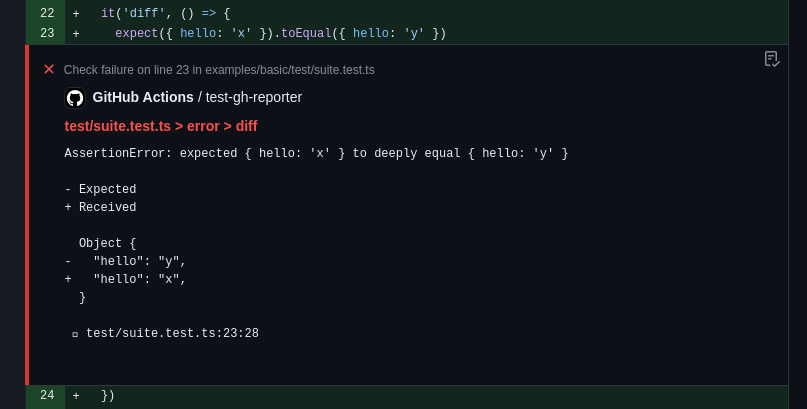
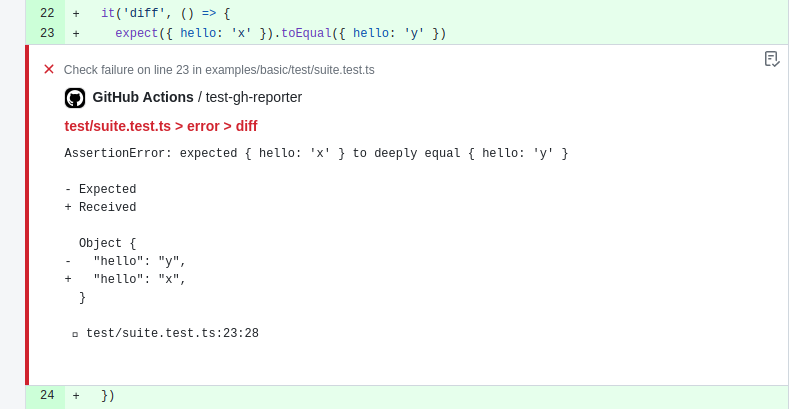 You can customize the file paths that are printed in [GitHub's annotation command format](https://docs.github.com/en/actions/writing-workflows/choosing-what-your-workflow-does/workflow-commands-for-github-actions) by using the `onWritePath` option. This is useful when running Vitest in a containerized environment, such as Docker, where the file paths may not match the paths in the GitHub Actions environment.
```ts
export default defineConfig({
test: {
reporters: process.env.GITHUB_ACTIONS === 'true'
? [
'default',
['github-actions', { onWritePath(path) {
return path.replace(/^\/app\//, `${process.env.GITHUB_WORKSPACE}/`)
} }],
]
: ['default'],
},
})
```
If you are using [Annotations API](/guide/test-annotations), the reporter will automatically inline them in the GitHub UI. You can disable this by setting `displayAnnotations` option to `false`:
```ts
export default defineConfig({
test: {
reporters: [
['github-actions', { displayAnnotations: false }],
],
},
})
```
The GitHub Actions reporter automatically generates a [Job Summary](https://github.blog/news-insights/product-news/supercharging-github-actions-with-job-summaries/) with an overview of your test results. The summary includes test file and test case statistics, and highlights flaky tests that required retries.
You can customize the file paths that are printed in [GitHub's annotation command format](https://docs.github.com/en/actions/writing-workflows/choosing-what-your-workflow-does/workflow-commands-for-github-actions) by using the `onWritePath` option. This is useful when running Vitest in a containerized environment, such as Docker, where the file paths may not match the paths in the GitHub Actions environment.
```ts
export default defineConfig({
test: {
reporters: process.env.GITHUB_ACTIONS === 'true'
? [
'default',
['github-actions', { onWritePath(path) {
return path.replace(/^\/app\//, `${process.env.GITHUB_WORKSPACE}/`)
} }],
]
: ['default'],
},
})
```
If you are using [Annotations API](/guide/test-annotations), the reporter will automatically inline them in the GitHub UI. You can disable this by setting `displayAnnotations` option to `false`:
```ts
export default defineConfig({
test: {
reporters: [
['github-actions', { displayAnnotations: false }],
],
},
})
```
The GitHub Actions reporter automatically generates a [Job Summary](https://github.blog/news-insights/product-news/supercharging-github-actions-with-job-summaries/) with an overview of your test results. The summary includes test file and test case statistics, and highlights flaky tests that required retries.

 The job summary is enabled by default and writes to the path specified by `$GITHUB_STEP_SUMMARY`. You can override it by using the `jobSummary.outputPath` option:
```ts
export default defineConfig({
test: {
reporters: [
['github-actions', {
jobSummary: {
outputPath: '/home/runner/jobs/summary/step',
},
}],
],
},
})
```
To disable the job summary:
```ts
export default defineConfig({
test: {
reporters: [
['github-actions', { jobSummary: { enabled: false } }],
],
},
})
```
The job summary title defaults to `Vitest Test Report` or `(${test.name}) Vitest Test Report` when [`test.name` is set](/config/name).
You can customize the title by setting `jobSummary.title` to distinguish multiple Vitest invocations that append to the same job summary. Please note that `test.name` will not be displayed when using a custom title.
```ts
export default defineConfig({
test: {
reporters: [
['github-actions', {
jobSummary: {
title: 'My Test Report',
},
}],
],
},
})
```
The flaky tests section of the summary includes permalink URLs that link test names directly to the relevant source lines on GitHub. These links are generated automatically using environment variables that GitHub Actions provides (`$GITHUB_REPOSITORY`, `$GITHUB_SHA`, and `$GITHUB_WORKSPACE`), so no configuration is needed in most cases.
If you need to override these values — for example, when running in a container or a custom environment — you can customize them via the `fileLinks` option:
- `repository`: the GitHub repository in `owner/repo` format. Defaults to `process.env.GITHUB_REPOSITORY`.
- `commitHash`: the commit SHA to use in permalink URLs. Defaults to `process.env.GITHUB_SHA`.
- `workspacePath`: the absolute path to the root of the repository on disk. Used to compute relative file paths for the permalink URLs. Defaults to `process.env.GITHUB_WORKSPACE`.
All three values must be available for the links to be generated.
```ts
export default defineConfig({
test: {
reporters: [
['github-actions', {
jobSummary: {
fileLinks: {
repository: 'owner/repo',
commitHash: 'abcdefg',
workspacePath: '/home/runner/work/repo/',
},
},
}],
],
},
})
```
### Minimal Reporter
- **Alias:** `agent`
Outputs a minimal report containing only failed tests and their error messages. Console logs from passing tests and the summary section are also suppressed.
::: tip Agent Reporter
This reporter is well optimized for AI coding assistants and LLM-based workflows to reduce token usage. It is [enabled automatically](#default-configuration) when Vitest detects it is running inside an AI coding agent.
:::code-group
```bash [CLI]
npx vitest --reporter=minimal
```
```ts [vitest.config.ts]
export default defineConfig({
test: {
reporters: ['minimal']
},
})
```
:::
### Blob Reporter
Stores test results on the machine so they can be later merged using [`--merge-reports`](/guide/cli#merge-reports) command.
By default, stores all results in `.vitest/blob/` folder, but can be overridden with `--outputFile` or `--outputFile.blob` flags.
```bash
npx vitest --reporter=blob --outputFile=reports/blob-1.json
```
We recommend using this reporter if you are running Vitest on different machines with the [`--shard`](/guide/cli#shard) flag or across multiple environments (e.g., linux/macos/windows). All blob reports can be merged into any report by using `--merge-reports` command at the end of your CI pipeline:
```bash
npx vitest --merge-reports=reports --reporter=json --reporter=default
```
When running the same tests across multiple environments, use the `VITEST_BLOB_LABEL` environment variable to distinguish each environment's blob. Vitest reads labels at merge time and displays results separately:
```bash
VITEST_BLOB_LABEL=linux vitest run --reporter=blob
```
You can also provide the label via the blob reporter option. This has higher priority than `VITEST_BLOB_LABEL`.
```ts [vitest.config.ts]
import { defineConfig } from 'vitest/config'
export default defineConfig({
test: {
reporters: [
['blob', { label: 'linux' }],
],
},
})
```
Blob reporter output doesn't include file-based [attachments](/api/advanced/artifacts.html#testattachment).
Make sure to merge [`attachmentsDir`](/config/attachmentsdir) separately alongside blob reports on CI when using this feature.
::: tip
Both `--reporter=blob` and `--merge-reports` do not work in watch mode.
:::
## Custom Reporters
You can use third-party custom reporters installed from NPM by specifying their package name in the reporters' option:
:::code-group
```bash [CLI]
npx vitest --reporter=some-published-vitest-reporter
```
```ts [vitest.config.ts]
export default defineConfig({
test: {
reporters: ['some-published-vitest-reporter']
},
})
```
:::
Additionally, you can define your own [custom reporters](/guide/advanced/reporters) and use them by specifying their file path:
```bash
npx vitest --reporter=./path/to/reporter.ts
```
Custom reporters should implement the [Reporter interface](https://github.com/vitest-dev/vitest/blob/main/packages/vitest/src/node/types/reporter.ts).
The job summary is enabled by default and writes to the path specified by `$GITHUB_STEP_SUMMARY`. You can override it by using the `jobSummary.outputPath` option:
```ts
export default defineConfig({
test: {
reporters: [
['github-actions', {
jobSummary: {
outputPath: '/home/runner/jobs/summary/step',
},
}],
],
},
})
```
To disable the job summary:
```ts
export default defineConfig({
test: {
reporters: [
['github-actions', { jobSummary: { enabled: false } }],
],
},
})
```
The job summary title defaults to `Vitest Test Report` or `(${test.name}) Vitest Test Report` when [`test.name` is set](/config/name).
You can customize the title by setting `jobSummary.title` to distinguish multiple Vitest invocations that append to the same job summary. Please note that `test.name` will not be displayed when using a custom title.
```ts
export default defineConfig({
test: {
reporters: [
['github-actions', {
jobSummary: {
title: 'My Test Report',
},
}],
],
},
})
```
The flaky tests section of the summary includes permalink URLs that link test names directly to the relevant source lines on GitHub. These links are generated automatically using environment variables that GitHub Actions provides (`$GITHUB_REPOSITORY`, `$GITHUB_SHA`, and `$GITHUB_WORKSPACE`), so no configuration is needed in most cases.
If you need to override these values — for example, when running in a container or a custom environment — you can customize them via the `fileLinks` option:
- `repository`: the GitHub repository in `owner/repo` format. Defaults to `process.env.GITHUB_REPOSITORY`.
- `commitHash`: the commit SHA to use in permalink URLs. Defaults to `process.env.GITHUB_SHA`.
- `workspacePath`: the absolute path to the root of the repository on disk. Used to compute relative file paths for the permalink URLs. Defaults to `process.env.GITHUB_WORKSPACE`.
All three values must be available for the links to be generated.
```ts
export default defineConfig({
test: {
reporters: [
['github-actions', {
jobSummary: {
fileLinks: {
repository: 'owner/repo',
commitHash: 'abcdefg',
workspacePath: '/home/runner/work/repo/',
},
},
}],
],
},
})
```
### Minimal Reporter
- **Alias:** `agent`
Outputs a minimal report containing only failed tests and their error messages. Console logs from passing tests and the summary section are also suppressed.
::: tip Agent Reporter
This reporter is well optimized for AI coding assistants and LLM-based workflows to reduce token usage. It is [enabled automatically](#default-configuration) when Vitest detects it is running inside an AI coding agent.
:::code-group
```bash [CLI]
npx vitest --reporter=minimal
```
```ts [vitest.config.ts]
export default defineConfig({
test: {
reporters: ['minimal']
},
})
```
:::
### Blob Reporter
Stores test results on the machine so they can be later merged using [`--merge-reports`](/guide/cli#merge-reports) command.
By default, stores all results in `.vitest/blob/` folder, but can be overridden with `--outputFile` or `--outputFile.blob` flags.
```bash
npx vitest --reporter=blob --outputFile=reports/blob-1.json
```
We recommend using this reporter if you are running Vitest on different machines with the [`--shard`](/guide/cli#shard) flag or across multiple environments (e.g., linux/macos/windows). All blob reports can be merged into any report by using `--merge-reports` command at the end of your CI pipeline:
```bash
npx vitest --merge-reports=reports --reporter=json --reporter=default
```
When running the same tests across multiple environments, use the `VITEST_BLOB_LABEL` environment variable to distinguish each environment's blob. Vitest reads labels at merge time and displays results separately:
```bash
VITEST_BLOB_LABEL=linux vitest run --reporter=blob
```
You can also provide the label via the blob reporter option. This has higher priority than `VITEST_BLOB_LABEL`.
```ts [vitest.config.ts]
import { defineConfig } from 'vitest/config'
export default defineConfig({
test: {
reporters: [
['blob', { label: 'linux' }],
],
},
})
```
Blob reporter output doesn't include file-based [attachments](/api/advanced/artifacts.html#testattachment).
Make sure to merge [`attachmentsDir`](/config/attachmentsdir) separately alongside blob reports on CI when using this feature.
::: tip
Both `--reporter=blob` and `--merge-reports` do not work in watch mode.
:::
## Custom Reporters
You can use third-party custom reporters installed from NPM by specifying their package name in the reporters' option:
:::code-group
```bash [CLI]
npx vitest --reporter=some-published-vitest-reporter
```
```ts [vitest.config.ts]
export default defineConfig({
test: {
reporters: ['some-published-vitest-reporter']
},
})
```
:::
Additionally, you can define your own [custom reporters](/guide/advanced/reporters) and use them by specifying their file path:
```bash
npx vitest --reporter=./path/to/reporter.ts
```
Custom reporters should implement the [Reporter interface](https://github.com/vitest-dev/vitest/blob/main/packages/vitest/src/node/types/reporter.ts).