
Status states #
How the extension communicates per-tab state, in two layers: the toolbar badge (at-a-glance) and the popup's status pills (in words). Two rules organize the badge vocabulary:
- A badge appears only when there is something worth noticing, so its mere presence is the first signal. Ordinary pages carry no badge at all.
- The channels split: the color says what the page is (green: verified
publication, amber: needs a look, red: an account you blocked), the
glyph says your relationship to it (
+can subscribe,?unknown,✓subscribed,Xblocked). No state is carried by color alone, so the vocabulary survives color blindness — under red-green deficiency the green drifts to a neutral grey, but presence and glyph still carry every state. - The two are independent, so they combine. A trailing
*is the one modifier: your relationship to the publication is unchanged, but this page is not its verified home. It rides with the amber so the caveat is not color alone, and it reads as what it is — a footnote, whose text is in the popup.
Every state also sets the toolbar icon's tooltip title, so hover and screen readers get the state in words.
Toolbar badge #
| State | When | Tooltip | |
|---|---|---|---|
 |
no badge | Non-http pages (no tooltip), pages with no publication, or the browser is offline. Being offline is not a property of the page, so it never gets an amber badge. | substandard — no publication on this page / substandard — offline; publication lookups need a connection |
 |
checking |
Navigation started or a re-check is running; the result is not in yet. Transient. | substandard — checking this page |
 |
detected |
A verified publication; you are signed in and not subscribed. The + marks the available action. |
substandard — publication detected |
 |
signedout |
A verified publication, but your subscription state is unknown: you are signed out, your session expired, or the subscription list could not load. Kept separate from detected so publications you already follow are not offered a second subscribe. |
substandard — publication detected; subscription state unknown |
 |
subscribed |
You are subscribed to this publication. | substandard — subscribed to this publication |
 |
detected-unverified |
detected, but the page is not the publication's verified home — most often a third-party reader showing somebody else's publication. The glyph and the offer are unchanged; the * is the caveat, and the popup names the real home and links it. |
substandard — publication detected, but this site is not the verified publisher |
 |
signedout-unverified |
signedout on such a page: neither the publisher nor your relationship to it is settled. |
substandard — publication detected, subscription state unknown; this site is not the verified publisher |
 |
subscribed-unverified |
subscribed on such a page. A subscription is a definite relationship and it keeps its ✓, but it no longer suppresses the caveat — the badge used to show a plain green ✓ here while the popup called the same page unverified. |
substandard — subscribed, but this site is not the verified publisher |
 |
failed |
Detection could not run for this page, so nothing is known about it — a record fetch that failed, a resolver that did not answer. Distinct from a * state: there, the extension knows something and is qualifying it. |
substandard — could not check this page |
 |
blocked |
The publication belongs to an account you have blocked. The only red in the vocabulary, and the only state that outranks every other — a block you made contradicting a subscription you made is exactly what wants surfacing. | substandard — you have blocked the account behind this publication |
The mapping lives in src/lib/icon.ts (iconStateFor, badgeFor,
titleFor); the worker applies it in src/background.ts.
Popup status pills #
The popup shows every applicable status at once, weighted by severity:
errors (red, circle icon) on top, then alerts (red, diamond icon), then
warnings (amber, triangle icon), with informational lines (grey, no banner) at
the bottom. The two reds mean different things — an error is the extension
failing at its job, an alert is the extension working and the answer being
serious, like a block you made — so each keeps its own shape, and severity
reads without color. The mapping lives in src/lib/status.ts
(statusMessagesFor).
A blocked account is also not shown on its own card: no avatar, no display
name, no bio, just "Blocked user" and the handle (blockedIdentity in
src/lib/profile.ts). The publication keeps its own name, icon and description
— the block is on the account, not on what it published.
Moderation labels are chips on the card rather than status pills, and they use the same two loud shapes: a label its labeler calls an alert gets the red diamond, anything milder the amber triangle. A label that asks for the content to be put behind a click covers the card until the reader asks for it, and that cover is red when the label is an alert.
| Screenshot | Scenario |
|---|---|
 |
No publication on the page: a single informational line. |
 |
A verified publication, signed out, after clicking the greyed-out Subscribe: the click raises a warning pill pointing at Atmosphere sign-in. Before the click there are no pills. Captured on standard.site, which carries no link-tag hint — the origin well-known probe found it. |
 |
The same publication as the row above, caught mid-load: the account card and the subscriber row stand placeholders at the height their content will take, while the publication itself is already drawn. Placeholders only appear once a lookup has run past SHOW_AFTER_MS (src/popup/cards/loading.ts), so a cache hit never shows one. Captured with those two lookups held open — a slow network, not a failed one. |
 |
Signed in and subscribed: no pills, the card speaks for itself. Captured on permadeath.com, the author's own publication, which emits the link hint and answers the origin well-known both. |
 |
The page shows a publication but is not its verified home; the warning links the real one. Captured on Standard Reader's view of the AT Protocol blog. |
 |
The publication belongs to an account you have blocked: the alert pill names it and links its profile, the account card shows "Blocked user" and the handle instead of their avatar, name and bio, and Subscribe has been clicked once, so it is armed as the red "Subscribe anyway?" that the second click would go through with. |
 |
Everything at once: an account you blocked, publishing something two labelers you listen to have both labeled, with Subscribe armed. Shown after clicking "Show anyway" — both labels blur content, so the popup covers the card until the reader asks for it. The only fully invented card in the set (see below). |
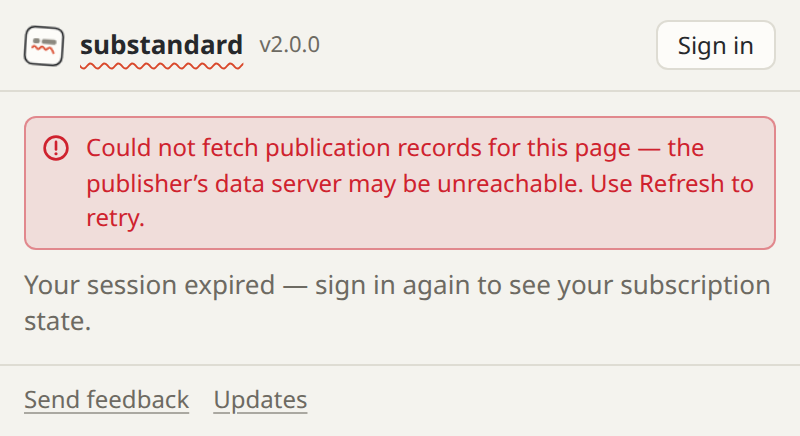 |
Two facts at once, ranked: record fetching failed (error) and the stored session expired (informational). |
 |
The browser is offline; the toolbar shows no badge and the popup explains why. |
Regenerating the images #
The screenshots are produced by a real headless Chrome running the built extension:
npm run capture     # build, then re-shoot docs/img/
npm run recapture   # the above, then every asset derived from the shots
capture builds first on purpose: the capture loads the extension from dist/,
so an unbuilt change screenshots the previous popup. Running the script
directly against a stale dist/ is refused with a message saying so, rather
than timing out on a state the built popup does not have. recapture follows
with npm run assets, which is what puts the new shots into the store tiles
(npm run cws) and the frontpage (npm run shots).
It runs Chrome twice. The failure states (no publication, fetch failed,
offline) come from an offline run with all external DNS mapped to localhost,
so they are real failures and nothing leaves the machine. The states that
show a publication card come from an online run against real standard.site
publications — listed as REAL in the script, one per detection route — so
the card, the icon, and the wording are a publisher's own data rather than a
fixture. Only the account mirror, the subscription record and the block are
fixtures; the capture never signs in. The blocked capture also rewrites the
publication's owner to the fixture DID, so the docs never show a real account
as one you blocked.
The moderated capture (popup-labeled) is the exception, and is a fixture from
top to bottom: no real publisher is going to model "blocked, and labeled by two
labelers", so the publication, its account and its page are invented (BAD_BLOG
in the script, on example.com, with placeholder copy). Its picture is two
emoji in an inline SVG, drawn by the capture machine's own color-emoji font, so
a machine without one shoots boxes there. The account card is seeded into the
popup's own cache and the capture checks that the seeded handle is the handle
that rendered — an unresolvable fixture DID otherwise degrades quietly to its
bare DID, which is how a cache-key change once reached these images. The labelers are real —
Bluesky's own moderation service and skywatch.blue — and the only thing stubbed
about them is their answer about this fixture: com.atproto.label.queryLabels is
served from the script, while resolving each labeler, reading its service record
and interpreting its label value definitions all happen for real. So the pill
names, their severity and the cover are the labelers' own, and a labeler that
stops declaring one of these values fails the capture. There is no local
stand-in for a labeler to use instead: a labeler is addressed by DID and the
extension refuses a cleartext labeler endpoint.
These captures are also what the public sees. scripts/shots.mjs names the
ones the Chrome Web Store listing and the substandard.blog homepage share, and
which of those get their own listing screenshot; npm run recapture covers the
downstream work, and on its own it is npm run cws to recompose the listing
screenshots and npm run shots to copy the captures into the frontpage (the
prek hooks do both, and scripts/deploy-site.sh re-runs the copy so a deploy
cannot ship a popup the extension no longer has).
The images are clipped to the popup's own measured size, so widening
body in popup/popup.css re-crops them instead of cutting them off, and each
brand/cws/screenshot-*.png follows its capture's aspect ratio. Headless
Chrome has no toolbar, so the badge tiles are drawn from the running
worker's own badgeFor specs on a toolbar-like ground — colors and glyphs
are authoritative, the tile framing is illustrative.
A publication that moves or goes away fails the capture loudly (the script
requires each REAL page to verify) rather than quietly changing the docs.
What counts as a finished popup #
Every capture but popup-loading waits for the whole of this, as one question
asked of the popup at one moment: no lookup still out (the card drops
aria-busy), no placeholder still standing, and every <img> the popup has
given a src finished. popup-loading waits for the opposite, since the
placeholders are what it is a picture of.
The three used to be waited for one after another, which does not hold, because
each of them creates the next: the account lookup is what gives the avatar its
src, so an image check that ran before that lookup landed was a check of a
popup that had no avatar yet. It passed, aria-busy cleared at the instant the
lookup landed, and the shot went out a fifth of a second later with a grey
circle where the account's picture goes.
The question is also asked again after the hold, immediately before the shutter. Everything the capture waits for is a sample of a popup that is still changing, and the screenshot is the far side of a wait and several round trips.